

One of my greatest fears in the outdoors is the weather. Being inside a storm at high altitude is, to say the least, humbling. In my digital life, I’m scared of data loss, yet I don’t do much to prevent it. I have TBs of memories and admittedly a setup that requires my attention. I got a taste of what losing photos means, and the moment I realized I was soaked in cold sweat; I lost my sleep that night.
TL;DR
An interrupted copy left the SSD (exFAT) unreadable. Later, the SSD also showed signs of hardware failure and was deemed defected by the repair shop; I can’t isolate a single root cause. What matters is that recovering was successful, with many learnings during the process, but it took nearly five days and certainly changed my approach to backups.
clone the failing drive to a healthy one with
ddrescueduplicate that clone to create a safe working copy
recover files with
testdiskfrom the working copyrepair and mount the working copy with
fsckdouble copy the recovered files from the repaired image (filesystem timestamps on files recovered with
testdiskwere incorrect)
Travel setup
While traveling I shoot in RAW (~50MB / lossless compressed) and video at 100 Mbps. My setup is optimized for the wrong thing; affordability and not redundancy.
I need, on average, 150 GB per week. My setup involved 2x UHS-II 128 GB SD cards, and a 2 TB USB-C SSD. Once a card is filled, I offload it to the SSD and overwrite it. This leaves me with a single copy of my data; very bad practice.
SD card ─┐
SSD ─> USB-C hub ─> iPhone 15 Pro
Power ──┘
This setup is fast, money efficient, and reasonably lightweight. It works, until it doesn’t.
Note: The UHS-II SD Cards are almost 4x the price of an SSD per TB.
What happened
I used a Crucial x9 2TB, exFAT formatted.
I offloaded the cards I needed to reuse on the SSD and overwrite them as I needed. At the end of my trip, I wanted to do a backup to the SSD so the majority of the cards have a double, apart from the single card I had to overwrite.
While I was initiating the backup, I forgot to plug in the power to the USB-C hub. This made it operational but very slow. When I noticed the slow transfer speeds (8 hours for 120 GB), I disconnected the hub from my iPhone. Mid-copy, and with an exFAT drive being non-journaled, likely corrupted the filesystem. I didn’t notice it at the moment, and that was fortunate since I would have been worried in the last days of my trip.
Once at home processing the cards, the drive wouldn’t mount. At that moment I knew I messed it up, yet I didn’t know exactly why and how.
The clone required almost two days, and it was my best shot to recover the photos; I couldn’t simply experiment on it, so I created a copy of the clone to a different drive. This would be my working copy.
testdisk is a magnificent utility. It allowed me to read the image, without mounting it, and take my photos out almost intact, full RAWs with all the metadata.
I’m glad I didn’t have to use Photorec since that would make me lose at least filesystem metadata e.g., file names. However, if things were worse, Photorec would be the best option.
Rescue / Impact Mitigation
Before investigating the root cause, I started on mitigating the impact; ddrescue to the rescue.
GNU
ddrescueis a data recovery tool. It copies data from one file or block device (hard disc, cdrom, etc) to another, trying to rescue the good parts first in case of read errors.
I created a clone of the SSD, to a hard drive. I practiced patience; a 2TB clone took multiple hours, and unfortunately it was less verbose than I thought. Once ddrescue finished, after 9 hours, it didn’t exit, and the hard drive was still spinning. This looked abnormal. The first time I canceled the cli, the image shrunk from 2TB to a few kB; clearly the process was not done and there was no evidence that ddrescue is working on something apart from the disk head moving up and down. iostat confirmed that, there is data being read from the drive. Was it a checksum? ddrescue should be verbose about that.
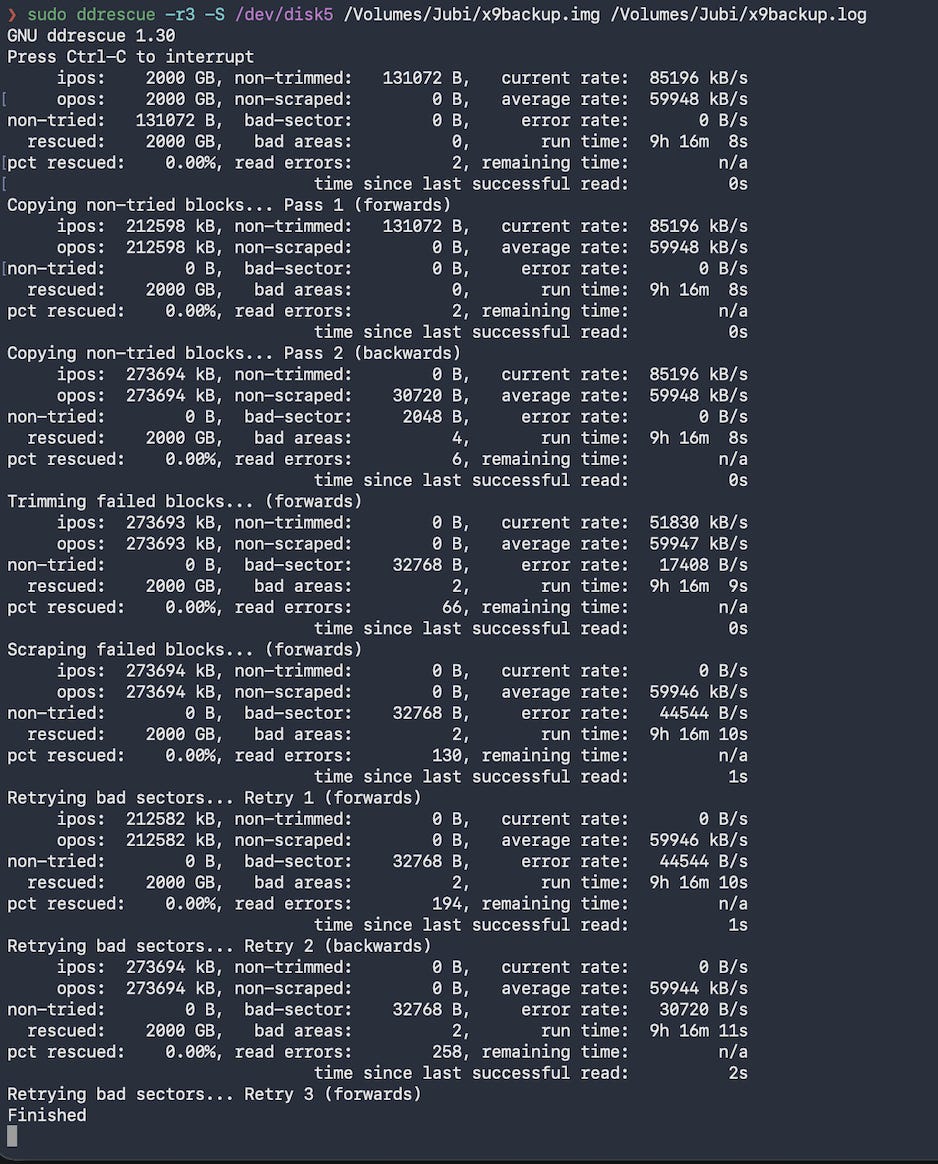
Finished for an additional 6 hours with no indication that something is still happeningSecond try. After ddrescue reported Finished, I left it for an additional 6 hours and while I was compulsively checking the shell and the drive, I saw the shell exiting. This marked the successful creation of a cloned image that contained my lost photos.
The clone required almost two days, and it was my best shot to recover the photos; I couldn’t simply experiment on it, so I created a copy of the clone to a different drive. This would be my working copy.
testdisk is a magnificent utility. It allowed me to read the image, without mounting it, and take my photos out almost intact, full RAWs with all the metadata.
I’m glad I didn’t have to use Photorec since that would make me lose at least filesystem metadata e.g., file names. However, if things were worse, Photorec would be the best option.
Root cause analysis
Once I had my photos, I wanted to understand what went wrong so I investigated further. I managed to easily fix the image with fsck and actually mount it! I did a second copy of my data from there.
Note: I noticed that photos rescued with testdisk had different times. The mounted one had the correct timestamps. I didn’t spend too much time understanding that.
Fixing the filesystem worked on the cloned image, but not on the actual SSD. The SSD returned an I/O error, which usually means a hardware issue.
fsck_exfat: Could not read from disk: Input/output error
Coming back to the original ddrescue, it reported two bad areas totaling 32KB, maybe that was it? It was impossible to fix the corrupted filesystem. A format was successful though, but I was still skeptical and curious. My main question was “can I trust this SSD again”?
I connected the drive to Windows, used Crucial’s utility (Storage Executive Tool) and immediately saw a large number retired blocks; that settled it.
Still in warranty, I sent it for an inspection and they informed that the drive was defective.
Was it a coincidence? Was it my unplugging? The interruption might have corrupted the filesystem, but the SSD also had retired blocks and was later confirmed defective. I can’t point to a single root cause. Anyway, it was a learning process and a vow to improve my redundancy.
Learnings and Actions
Filesystem Journaling
Always use a journaled filesystem; in my case APFS.
From wiki and I suggest reading the full Rational entry:
A journaling file system keeps track of changes not yet committed to the file system’s main part by recording the goal of such changes
Updating file systems to reflect changes to files and directories usually requires many separate write operations. This makes it possible for an interruption (like a power failure or system crash) between writes to leave data structures in an invalid intermediate state
To prevent this, a journaled file system allocates a special area — the journal — in which it records the changes it will make ahead of time. After a crash, recovery simply involves reading the journal from the file system and replaying changes from this journal until the file system is consistent again. The changes are thus said to be atomic (not divisible) in that they either succeed (succeeded originally or are replayed completely during recovery), or are not replayed at all (are skipped because they had not yet been completely written to the journal before the crash occurred).
NAND block remapping
NAND cells can eventually fail. The SSD controller can recognize this and retire them from its operational space. Bad blocks are to be expected, and every SSD ships with them, however a growing number of them is concerning.
I/O Errors
Never try to repair a file system on a drive with I/O errors; you will probably lose even more data
source: https://www.gnu.org/software/ddrescue/manual/ddrescue_manual.html#Important-advice
Note: this is something that my LLMs missed and I discovered going through the docs. Do your due diligence before important actions.
Actions
At minimum two backups. That means carrying more SD cards and an SSD to back them up to. I should have a backup to a third location. In cases where I have fast internet I will consider getting some cloud storage too. However, in the developing countries and remote places I visit, uploading 150GB is not an easy task.
Ensure that my travel SSD is always in APFS to protect against interruptions.
Conclusion
Although I lived these moments during my trip and still have the memories, I was upset to lose my shots; my effort to freeze time. I reminded myself that nothing lasts forever, things change, what feels stable can be fragile and can fail at any moment. For some things we can prepare, and for some others not, and some are unavoidable.